JS - Numbers and Math

Initialization
const score = 100
console.log(score)      // 100

const balance = new Number(100)
console.log(balance)    // [Number: 100]
score is primitive (raw piece of data), balance is an object that contains the value 100 but also carries extra properties.
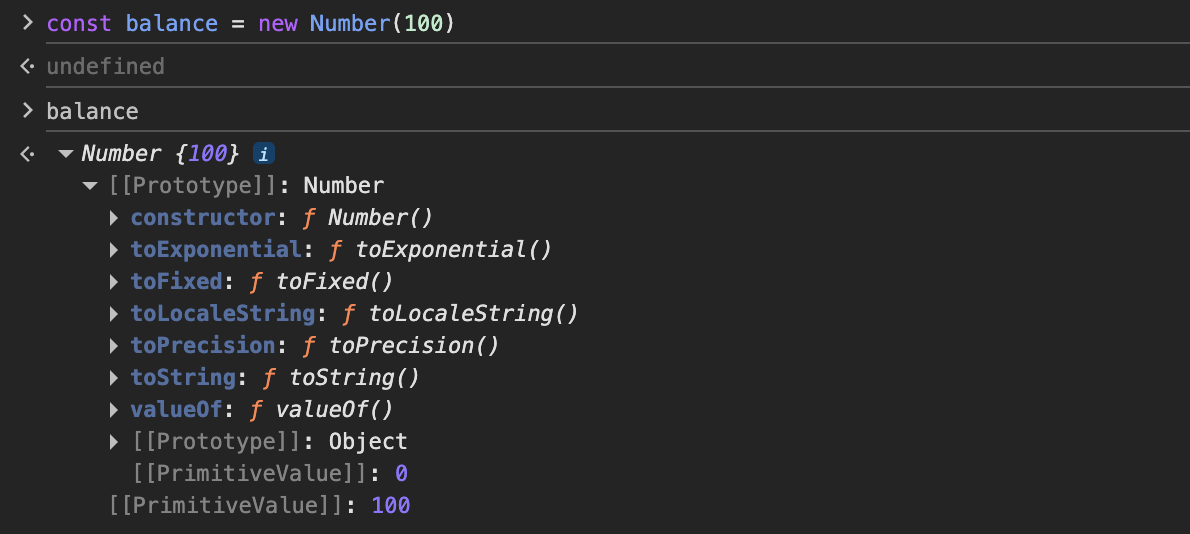
We can however still use the properties on score (primitive) this is because JavaScript temporarily "wraps" it in an object (Auto-boxing), runs the method, and then throws the object away. This gives you the best of both worlds: the speed of a primitive and the power of an object.
Also in js 10 is a number, 10.123 is a number, 100_000_000 is a number, no distinction between integers and floats, and the last one is just formatting.
Infinity
Infinity is a number value in JS.
const infiniteRange = Infinity
const negativeInfiniteRange = -Infinity

console.log(1/0) // Infinity
Common Methods
Formatting Methods - all return string
.toFixed(digits) : Rounds the number to a specific number of decimals.
Example - 100.567.toFixed(2) -> "100.57"
.toPrecision(digits) : Formats the number to specific total length. If you give the precision less than decimal place it will give the value In exponential
Example - 12.545.toPrecision(2) -> "13"
1234.545.toPrecision(2) -> 1.2e+3
.toExponential(digits) : Returns a string representing the number in an exponential notation.
Example - 100.toExponential(2) -> "1.00e+2"
Localization & Conversion - all return string
.toLocaleString(locale): Converts a number into a string based on a specific country's formatting (e.g., adding commas for thousands). 'en-IN' for Indian type.
1000000.toLocaleString('en-US') -> "1,000,000"
.toString(base): Converts the number to a string. You can optionally specify a base (like 2 for binary or 16 for hex).
(15).toString(2) -> "1111"
(15).toString() -> "15"
parseInt & parseFloat - takes string, returns number
parseInt and parseFloat are your "extraction experts." They are designed to look at a string, pull out the numbers they find at the beginning, and throw away the rest.
Can take in two arguments, first being the value which will be converted to number, second the base or "radix" of the value given in first argument.
const fuelReading = "142.75 tons"
const sectorCode = "0xA3"
const countDown = "007"

console.log(parseInt(fuelReading))      // 142
console.log(parseFloat(fuelReading))    // 142.75
console.log(parseInt(sectorCode))       // 163
console.log(parseInt(countDown))        // 7

console.log(parseInt("  42  ", 10)); // 42 (Handles whitespace)
console.log(parseInt("v2.0", 10));   // NaN (Doesn't start with a number)
console.log(parseInt("111", 2))         // 7, converted from binary
Comparison: parseInt vs parseFloat vs Number()
Input | parseInt | parseFloat | Number() |
|
|
|
|
|
|
|
|
|
|
|
|
|
|
|
|
If you are dealing with very large numbers (like Web3 transaction hashes or BigInts), parseInt might lose precision. For those, you'll want to use BigInt(string).
Static Check Methods - all return boolean
They are called directly on the Number object.
Number.isInteger(value): Checks if the value is a whole numberNumber.isNaN(value): Checks if the value is specifically NaNNumber.isSafeInteger(value): Checks if the number fits within the safe range (2ˆ53-1)
All return either true or false.
Max and Min Value and other Number values - returns number
Number.MAX_VALUE -> 1.7976931348623157e+308
Number.MIN_VALUE -> 5e-324
Number.MAX_SAFE_INTEGER -> 9007199254740991 or 2ˆ53-1
Number.MIN_SAFE_INTEGER -> -9007199254740991 or -(2ˆ53-1)
Number.EPSILON -> 2.220446049250313e-16
Math Library Common Methods
Math is an object in Javascript with a ton of useful methods to do mathematical operations on numbers.
console.log(Math)-> Object [Math] {}Math.abs(-6)-> 6, give the absolute valueMath.round(4.6)-> 5, rounds of if value after decimal has 5 or above it incrementsMath.floor(4.6)-> 4, returns the immediate lower integer, if -4.6 it goes to -5, always goes towards -InfinityMath.ceil(4.6)-> 5, returns the immediate higher integerMath.min(4, 3, 6, 8)-> 3, returns minimum of all the argumentsMath.max(4, 3, 6, 8)-> 8Math.trunc(13.37)->13, cuts off everything after decimal value
Q) Quick question find the max and min number item inside an array
const temp = [-120, 43, 56, -23]

console.log(Math.min(...temp)) // -120
console.log(Math.max(...temp)) // 56
Math.random()
When you call the Math.random() method you get a long decimal number between 0 (inclusive) and 1 (exclusive) in math [0, 1), so never 1.
To find out a random number in a range between min and max
Math.floor(Math.random()*(max - min + 1)) + min
Breakdown:
Math.random() -> gives a value in [0, 1) range
(max-min) sets how big we want the range to be, say if it's 100, [0,1) * 100 = [0,100), we add a 1 to cover the last digit as 100 was excluded, [1,101)
min is added to shift the range.
Math.floor() is used so the ultimate number is an integer number with no decimals since random returns decimal.
0.1 + 0.2 != 0.3, What ?!
console.log(0.1 + 0.2)
// 0.30000000000000004
he reason lies in how computers handle math using a standard called IEEE 754 (Floating Point Arithmetic).Computers count in Base-2 (binary). In binary, a number can only be represented cleanly if its denominator is a power of 2 (like \(1/2, 1/4, 1/8\)).
0.1 in binary is an infinite repeating fraction:
0.0001100110011...0.2 in binary is also infinite:
0.001100110011...
Since a computer has limited memory (64 bits for a Number in JS), it has to cut off these infinite fractions at a certain point. When you add these two slightly imprecise numbers together, the tiny rounding errors "leak" into the result, giving you that extra 4 at the 17th decimal place.
For display we can use toFixed()
console.log((0.1 + 0.2).toFixed(1)) // 0.3
For calculation we can convert it to whole numbers, calculate, then divide it by 10ˆn
const result = (0.1 * 10 + 0.2 * 10) / 10;
console.log(result); // 0.3
For comparison we can use Number.EPSILON, which represents the smallest possible difference between two numbers.
const isEqual = Math.abs((0.1 + 0.2) - 0.3) < Number.EPSILON;

console.log(isEqual); // true


